



—
Can I access remote desktop from iPhone?
Yes, you can access a remote desktop from your iPhone conveniently using an iOS remote access application. This app enables users to establish connections and manage other devices seamlessly from their iPhone or iPad. It provides iOS users with a straightforward method to remotely oversee and control various devices, including computers and Android mobile devices.
AnyViewer is the best option for iOS remote access. It supports iOS, Android, and Windows, allowing you to control PCs, laptops, and Android devices directly from your iPhone or iPad. It is dependable, with over 60 million people globally using its iOS app, which has been downloaded over 10,000 times.
Why choose AnyViewer?
There are many iOS remote access apps out there. Why should you choose AnyViewer? The following are reasons:
- Extensive security protocols
Advanced security features like two-factor authentication, top-notch asymmetric ECC 256-bit end-to-end encryption, and others protect your iPhone remote access.
- Cutting-edge technology
AnyViewer is a pioneer in remote desktop technology, offering smooth control of iOS devices from desktops and Android devices.
- Easy to assemble and operate
With AnyViewer, controlling distant PCs from your iPhone or iPad is simple. Because of its user-friendly design, even beginners can use it.
What can you do with AnyViewer iOS remote access app?
For IT support, remote work, and collaborative projects, the AnyViewer iOS remote access software is quite popular in both personal and business settings. It provides several key features that improve the remote access experience. Below are a few examples:
- Instant remote support
Quickly provide on-demand or scheduled remote support, allowing you to control PCs from your iPhone or iPad when providing customers with remote IT support services.
- Unattended remote access for iOS
Enable remote access to manage and control devices without needing a customer at the other end. Configure multiple Windows and Android devices for unattended access, controlling them directly from your iPhone or iPad.
- Screen mirroring
Not only can you view and control your device from your iPhone or iPad, but you can also mirror your iOS screen on PCs, Android devices, or other iOS devices for efficient multitasking.
- Multi-monitor tracking
During assistance sessions, you can easily move between various monitors connected to a remote device right from your iOS smartphone.
- Financial management
Use remote desktop software to carry out administrative activities from a distance without starting unattended access sessions. With integrated tools, you can effortlessly carry out tasks like computer restarts and shutdowns as well as control power settings like lock, hibernate, and log off.
- Privacy mode
In a remote session, you can darken the screen of the remote computer and disable its keyboard and mouse input, ensuring that your session remains private and uninterrupted.
How to remotely access devices from iOS
The AnyViewer iOS remote access app is freely available for download on the App Store. You have the option to continue using the free version or upgrade to a flexible and cost-effective plan that aligns with your specific remote support needs. To begin, follow these steps:
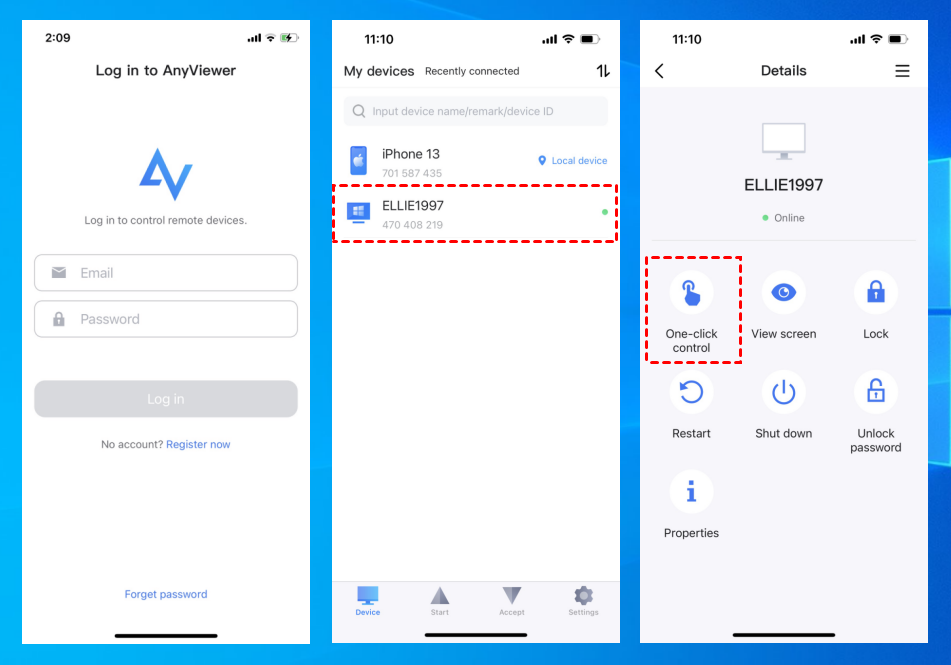
Step 1. Install AnyViewer on your PC. On the machine you wish to control remotely, download AnyViewer. Create an AnyViewer account, then remember to keep your session open.

Step 2. Install AnyViewer on your iPhone. Go to the App Store on your iPhone and download the AnyViewer app. Log in with the same AnyViewer account information as on your computer.
Step 3. Connect to your computer. Once logged in on both devices, choose your computer from the list that appears on your iPhone. Select “One-click control” to start unattended remote access with ease.

Conclusion
Thanks to AnyViewer’s robust iOS remote access technology, users can easily manage PCs and Android devices from their iPhones and iPads. It is easy to use, safe, and includes many features, such as support for multiple monitors and screen mirroring. AnyViewer is the greatest choice for reliable and safe remote access on iOS, with millions of satisfied users throughout the globe.
—
This content is brought to you by Imran Ali
Photos provided by the author.

